Full Body Explorer
Free 3D human anatomy: add skin, muscle, organs, vessels and brain over the skeleton one layer at a time, and click any part to see its name. No sign-in.
Visualiser
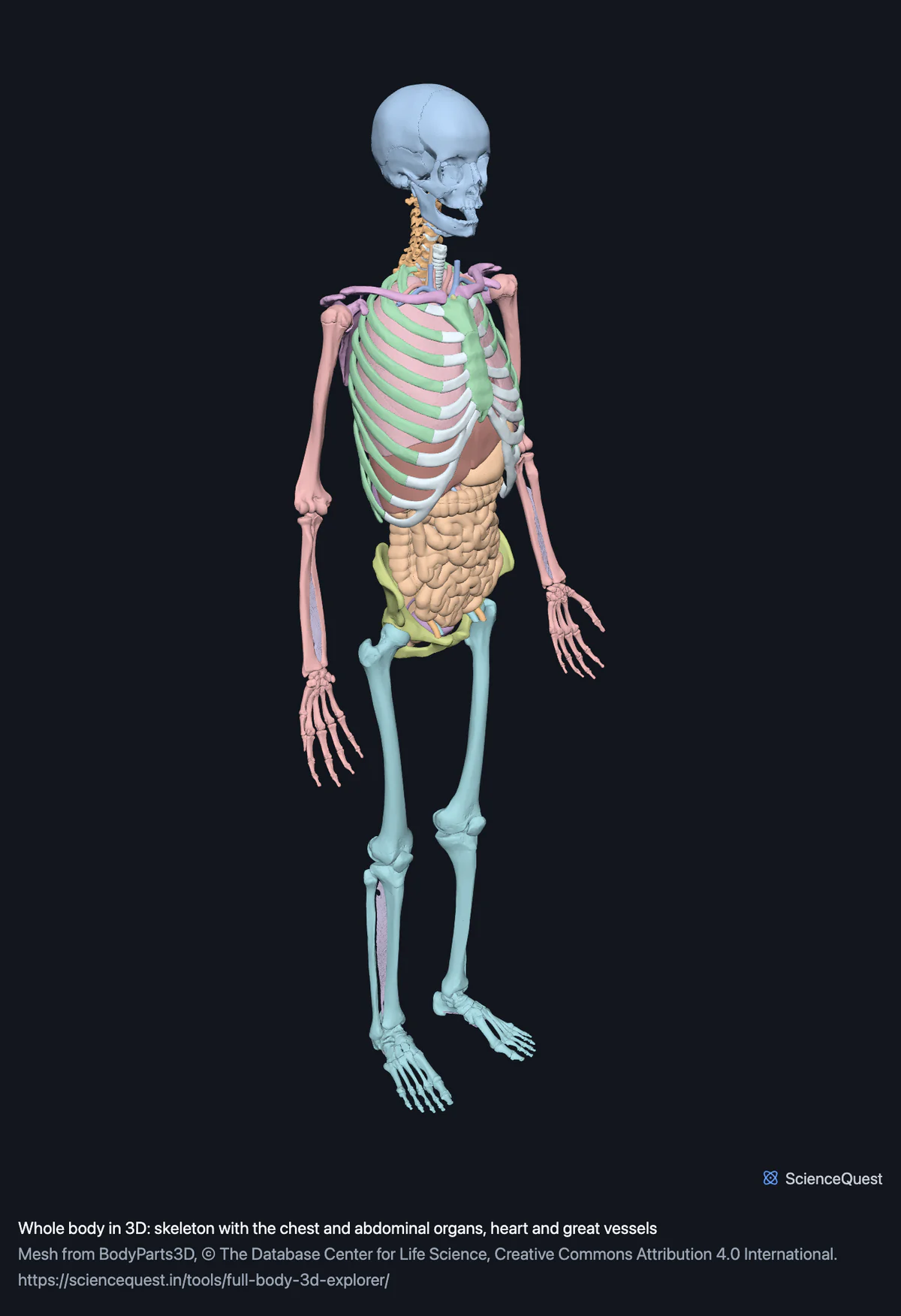
Full skeleton, 203 bones in 248 meshes
Checking this device for a stored copy.
Start here
- Press Skin and bone, then Bone only The whole point of the page in two presses. The skin lands exactly over the skeleton because both come from the same body in the same coordinate frame, and taking it off gives the graphics memory straight back.
- Add Back muscles and Chest wall muscles together Two layers that meet along the ribs, which is the relationship no single model can show. Watch the triangle figure as you add them: that number, not the download size, is what decides whether the next layer fits.
- Keep it to two or three layers The outermost layer hides everything beneath it, so more layers rarely means more visible. Skeleton plus one muscle group is the view that actually reads.
The skeleton, with muscle, organs, vessels, brain, teeth and skin as layers. No nerves beyond the optic, no lymphatics, and no layers within the skin. Nothing here animates: every mesh is one instant of one body. Thirteen layers at once is more than most devices will hold, and the page does not pretend otherwise.
Where this comes from
Segmented from imaging of one adult male body, not drawn by an artist, so the shapes are measurements. Two consequences worth knowing: it is one person’s anatomy rather than an average, and faint stepping on some surfaces is the resolution of the original scan rather than a rendering fault.
Meshes from BodyParts3D, © The Database Center for Life Science, under Creative Commons Attribution 4.0 International. Names and identifiers are the dataset’s own: Foundational Model of Anatomy identifiers and English labels, as its parts list gives them. Converted meshes are shared under the same licence.
Changes made: Meshes were converted from binary STL to an indexed mesh with 16-bit quantised vertex positions, and surface normals were recomputed from the geometry. No vertex was moved other than by that quantisation, whose worst-case error on any one coordinate is reported on the page. On this page it is at most 0.0129 mm, the largest among the 14 models the page can load.
Latin terms for 471 of the 926 structures in these models come from English Wikipedia anatomy infoboxes, under Creative Commons Attribution-ShareAlike 4.0, joined by Wikidata property P1402, Foundational Model of Anatomy identifier. Only a term a source states for that structure is used, never one constructed from a family name, which is why the rest carry no Latin rather than a guess.
Citing this tool
Last updated . Add the date you accessed it as well, which a citation of a page that can change asks for. If a specific view matters, cite the page address as it stands in your browser instead: it records what is selected and shown.
One body, one coordinate frame
Every model on this site is segmented from the same adult body, and each region file stores its geometry in the same absolute millimetres. That is what makes this page possible with no alignment step at all: the frontal bone’s centroid differs by 0.0007 mm between the skeleton file and the skull file, which is quantisation noise rather than a discrepancy.
So a layer is not a separate model being fitted to this one. It is the rest of the same body, arriving in the place it was always in.
Why layers rather than one enormous file
The skeleton and every layer together are 926 meshes and 26 million triangles. Shipped as a single region it would be around 430 megabytes of graphics memory, which a desktop would hold and a phone would refuse, and it would be a waste of all of it: the outermost surface hides everything inside, so almost none of those triangles would ever be visible at once.
Layers invert that. You load the two or three that answer your question, and you can take one off to see what is under it. Removing a layer disposes its geometry, so the memory comes back rather than accumulating silently, which is the difference between removing and merely hiding.
The presets are combinations that have been checked to fit, which is why they are there rather than as decoration. Faced with thirteen switches it is reasonable to press the interesting sounding ones and end up with a scene the device will not hold. Every preset here stays under the prompt with the skeleton already loaded, and the largest, trunk muscles, comes to 7.80 million triangles against a prompt at 8.
What the triangle figure is for
The layer panel shows how many triangles are in the scene, and it is the honest limit rather than the download. A download is your decision and its size is printed on every button. Graphics memory is not a decision: a scene too large for the device fails instead of slowing down.
For calibration, the skeleton alone is 2.36 million triangles and has worked on everything tested, including software rendering with no GPU at all. The lower limb muscles are 4.6 million on their own. If a layer refuses to load, the structure list still holds every name.
Duplicates are skipped, not drawn twice
Regions overlap on purpose. The skeleton contains every bone the skull, hand and knee models contain, and the abdominal and reproductive models share the pelvic floor. When a layer arrives, any structure already in the scene is left alone, because two identical surfaces at the same depth do not look like a mistake, they look like a faint shimmer as the renderer picks a winner per pixel.
Common questions
How is this different from the separate models?
It is the same meshes, in one scene. Every model on this site is segmented from one body in one coordinate frame, which means a layer needs no aligning: switch the skin on over the skeleton and it lands exactly where it belongs, to a fraction of a millimetre. What this page adds is the ability to hold several at once and take them off in order, which is the thing a separate page for each cannot do.
Do I have to download all of it?
No, and you should not. The skeleton loads first and every other layer is a separate button with its own size printed on it, so you take what you want. The skeleton and all thirteen layers together are about 130 megabytes and 26 million triangles, which is more than most machines will hold, and there is no reason to ask for it: the outermost layer hides everything under it anyway, so a useful view is usually two or three layers.
Why does it warn me about triangles rather than megabytes?
Because the download is your decision and the graphics memory is not. A large download costs you time and nothing else, and the figure is on the button before you press it. A scene too big for the device does not load slowly, it fails, so the panel shows how many triangles are in the scene as you add layers. For reference the skeleton alone is 2.36 million and works everywhere we have tested.
What happens when I remove a layer?
Its geometry is thrown away and the graphics memory goes back, which is the difference between removing a layer and hiding one. Hiding leaves the buffers uploaded, so a viewer that only hid things would fill up with everything you had ever switched on. Structures already in the scene are not loaded twice: the abdominal and pelvic floor muscles and the male reproductive organs share both pubococcygei and the external anal sphincter, so whichever of the two layers you add second skips them, and removing that second layer leaves them in place.